
BitTorrent Speed
Get faster downloads and BTT token rewards.
- Powered by BTT token and the blockchain.
- Drives faster torrent download speeds
- Earn BTT crypto torrent token

How it Works
3 steps to faster torrent downloads and BTT rewards
Step 1 - Enable your wallet
BitTorrent Speed is a feature that extends the traditional experience of our Windows and Mac-based torrent clients. When downloading or upgrading to the latest version of µTorrent Classic for Windows, or BitTorrent or µTorrent Web, a digital cryptocurrency wallet and a BTT token balance will be automatically enabled.

Step 2 - Enjoy faster download speeds
When downloading torrents, BitTorrent Speed automatically bids BitTorrent (BTT) to other users for faster speeds. Just use the torrent program like normal, there is nothing else you need to learn or do.

Step 3 - Earn BTT
When a torrent file finishes downloading, your BitTorrent client can automatically earn BTT by seeding. The longer you seed torrents, the more BTT crypto torrent tokens you may be able to earn.

Features
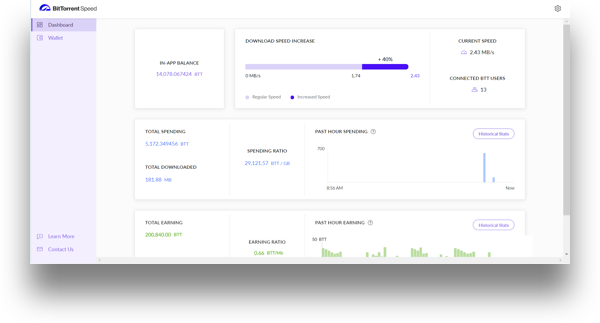
Earnings dashboard and encrypted wallet, all in one
The Dashboard
Track and manage your earnings and improved download speed in one place.

The Wallet
Monitor your BTT assets in the encrypted Wallet. Send or receive tokens with a simple click.

Benefits
Reasons to try BitTorrent Speed.

Easy to use
The benefits of BitTorrent Speed are automated, including token bidding for faster downloads and BTT token rewards. There is nothing new you need to learn.

Backward compatible
Not interested in earning tokens with BitTorrent Speed? You can keep using your existing client, as it’s fully compatible with the new generation of BitTorrent Speed enabled torrent clients.

No mining
The blockchain does not need your computer resources to process transactions, so BitTorrent applications will never mine.

Free to use
Despite the addition of BitTorrent Speed, the family of BitTorrent products will always be free for everyone to use.
Roadmap
Learn where our team is taking BitTorrent Speed.
Q2
2022
- Speed integrated within utWeb and btWeb
- Improve BitTorrent help center
Q3
2022
- Speed bidding improvements
- BitTorrent Wallet Improvements
- Add reCaptcha for withdrawals
Q4
2022
- BTT Redenomination Plan
- AirDrop campaigns
- Add support for Safari browser
Product Release Notes
Monitor our progress in greater detail
Fixes:
- Application’s crash rate decreased
- Web Wallet tcp open port crash fix
- Minor UI/UX fixes
Fixes:
- Application’s crash rate decreased
- Customer Support email template is translated
- Stability for Speed build for Mac OS improved
- Issues with filtering in the ransaction history are fixed
Fixes:
- Translation errors are fixed
- Login errors are fixed
- UX/UI issues are fixed for better user experience
Fixes:
- Fixed major crash issue
- Fixed logging of “Increase speed” toggle
- Fixed wallet crashing during service downtimes
- Prevented seed phrase from being set on failure to import account
Fixes:
- Fixed Airdrop redeem button behavior
- Fixed crash when the modal dialog is shown
- Fixed the state when Modal dialog was not preventing input
Fixes:
- uTorrent app does not crash after the app starts to download a file
- Recovery information pop-up does not disappear
- Redirect pop-up to Dashboard screen
Fixes:
- Wallet installation failure crashes
- Attempts to withdraw without a registered account related crashes
- Withdraw and Deposit fields are cleared every time a user leaves the Wallet dashboard
Tips on how to optimize your BitTorrent download speed